
In Development
This plugin is currently in development.
Quick Start
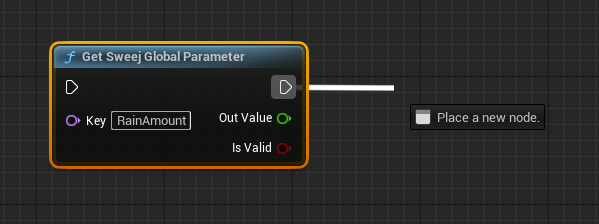
In Blueprint: Set a Parameter
- Add Node: Search for and add "Set Global Parameter" node
- Configure:
- Parameter Name: Choose any name (e.g., "RainAmount")
- Value: Connect to your variable (typically 0.0 to 1.0)
- Execute: Connect to your update logic
In MetaSound: Get the Parameter
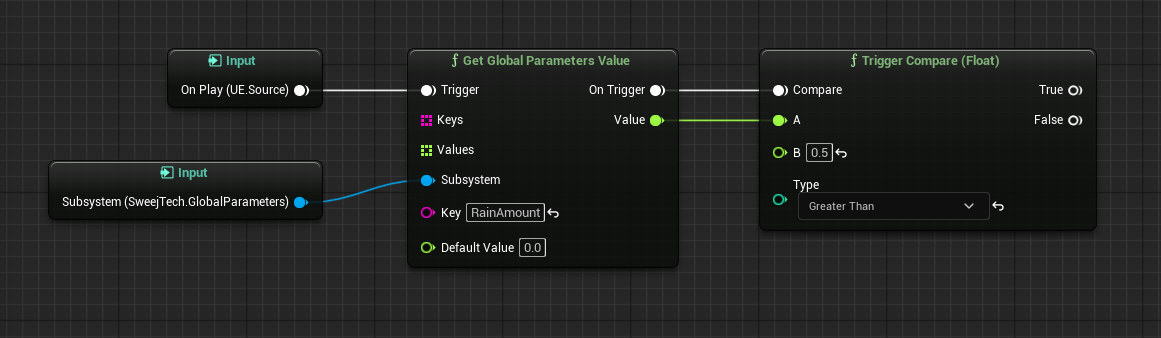
- Add Interface:
- In the MetaSound Details panel, find "Interfaces"
- Click "+" and select
SweejTech.GlobalParameters

- Get Value:
- Right-click in graph and search for "Get Global Parameters Value"
- Set Parameter Name to match your Blueprint (e.g., "RainAmount")
- Set Default Value (used when parameter isn't set)
- Connect output to your sound controls
WARNING
We are currently in the process of replacing the Keys and Values inputs, in favor of the Subsystem input.
The expected inputs are Subsystem, Key, Default Value
Next Steps
Now that you understand the basics:
- See the Features page for detailed examples and workflows
- Learn about best practices for parameter naming and organization
- Explore advanced use cases (weather systems, game states, dynamic mixing)