
Concepts
In this section we will explore some of the basic concepts around how the SweejAmbience system works by examining the following variables and how they interact: Weight, Priority, Resulting Level, Proximity, Max Weight.
Priorities, Weight & Resulting Level
Each SweejAmbience Actor has a Weight and a Priority, and these are the key factors in determining its Resulting Level. Under normal circumstances the Resulting Levels of all active SweejAmbience Components will sum to 1.0.
You can think of the Weight as representing each actor's desire to contribute to the ambience, how much of the Resulting Level it wants. However, the share of the Resulting Level given to each Actor is based upon their Priority. If the Actor with the highest priority has a Weight of 1.0 then this will be allocated all of the Resulting Level and you will only hear this sound, however if its Weight is less than 1.0 then any remaining Resulting Level will then go to the next priority sound, and so on. (Note: If the priorities of both actors are the same then no attenuation will apply, both sounds will be heard at their respective volumes).
The heights of the segments in the illustration below shows how the Resulting Level of each sound would be impacted by the cascade like effect of Priorities and Weights. Only when a higher priority sound has a Weight below 1.0 does the system allow any remainder Resulting Level to be shared with lower priority sounds.
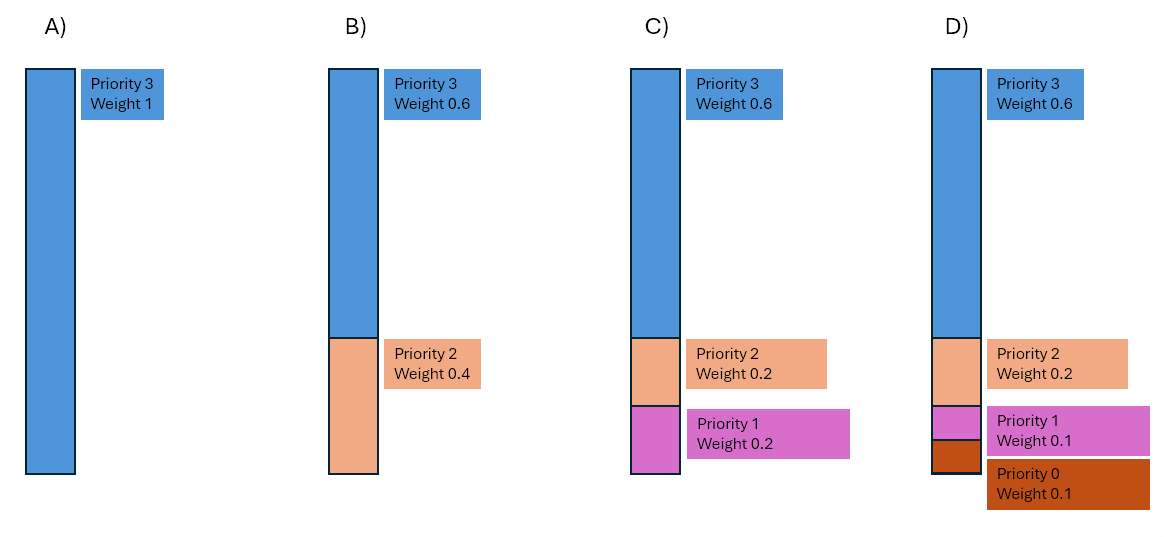
What this enables is the automatic blending between adjacent sound areas.
Sweej Ambience Sounds, Sweej Ambience Volumes, Attenuations, and Weights
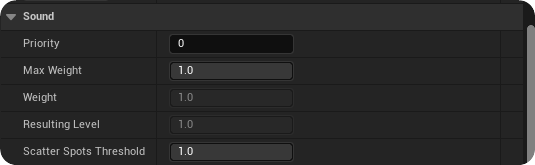
SweejAmbienceSound actors are for global sounds that can be heard throughout a level. Their Weight is always set to 1.0 (unless dynamically adjusted via Blueprints - see the 'Components, Extensibility & Case Studies' section below). They are typically set to the lowest priority so that they can be overridden when the listener enters a higher priority Sweej Ambience Volume, which are used to demarcate sound areas within the game world.
SweejAmbienceVolume actors are used for specific areas and locations in your level and their Weight is determined by the listeners Proximity to them (and any Max Weight settings -- which we will get to in a minute). In order to transition smoothly between global SweejAmbienceSounds and SweejAmbienceVolume areas, and between SweejAmbienceVolumes themselves, they have an Attenuation Distance setting.
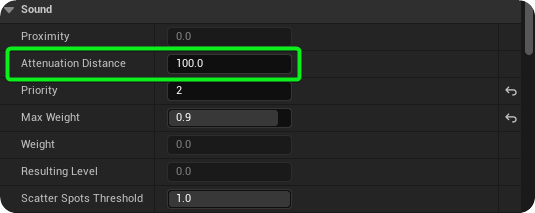
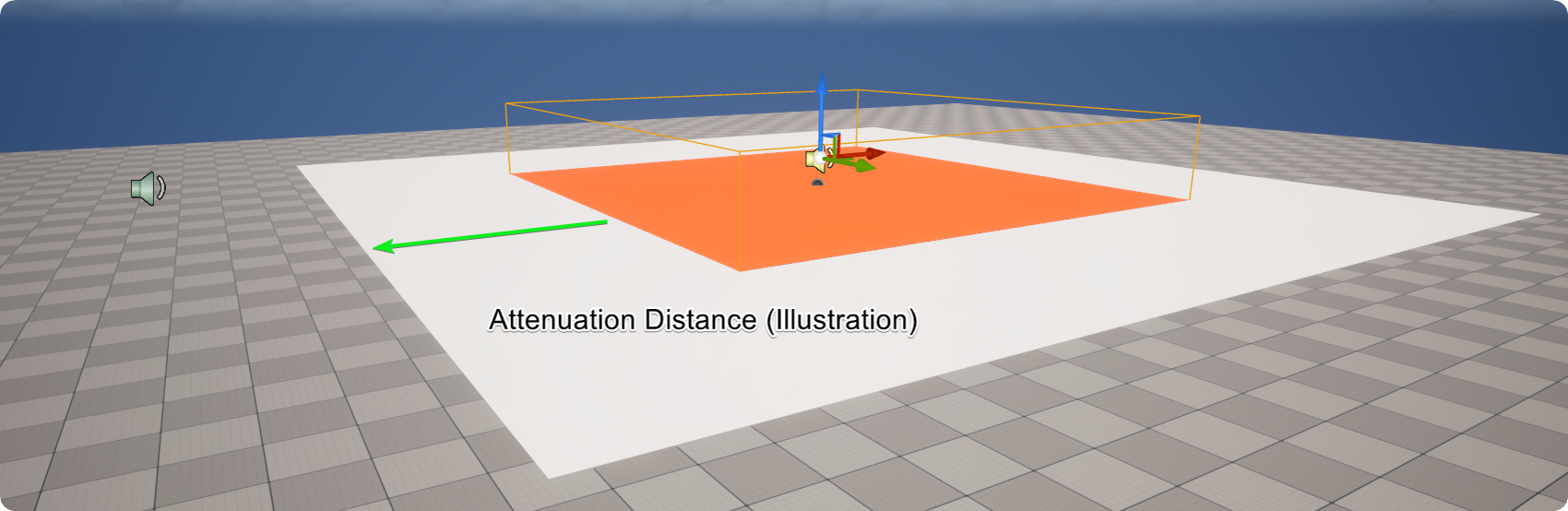
The Attenuation Distance of a SweejAmbienceVolume defines the linear fade-in distance from volume's edge.

This is used to determine the Proximity value which is 1 -- (Player Distance / Attenuation Distance)

This Proximity value is used to adjust the Weight of a SweejAmbienceVolume as the listener moves across the Attenuation Distance and towards the area defined by the volume itself. Assuming that the SweejAmbienceVolume is of a higher priority then this Weight increase will lead to an increase in its Resulting Level and a decrease in the Resulting Level of any overlapping SweejAmbienceSound or SweejAmbienceVolumes.
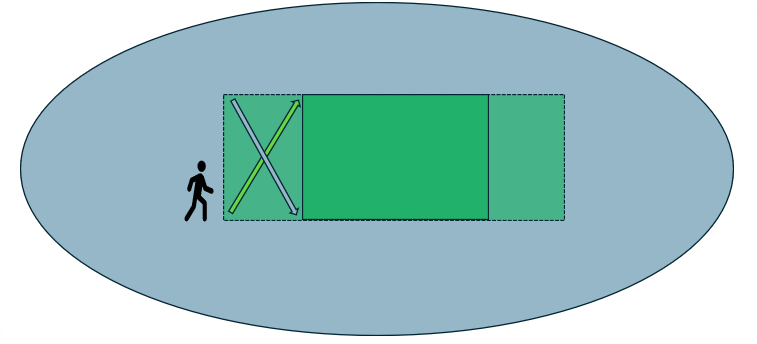
Green Arrow: Proximity, Weight and Resulting Level of SweejAmbienceVolume
Blue Arrow: Resulting Level of SweejAmbience Sound
Blending Ambiences with Max Weight
In order to allow SweejAmbienceSounds and SweejAmbienceVolumes to overlap and blend, a Max Weight value can be used. This sets and upper limit that the Weight can reach. If the Max Weight value is 1.0 then the Weight will directly correlate with the Proximity value since for SweejAmbienceVolumes:
Weight = Proximity * Max Weight
However, if the Max Weight is less than 1.0 this means that its Weight will be capped at less than 1.0, thereby leaving the remaining Resulting Level to be filled by other lower priority sounds. (For SweejAmbienceSounds their Weight will always equal the Max Weight since these are global and do not have Attenuation Distance settings.)
For example, if a global SweejAmbienceSound has a Priority of 1.0 and the player enters a SweejAmbienceVolume with a Priority of 2.0, and a Max Weight of 0.9 then the SweejAmbienceSound will continue to play at a Resulting Level of 0.1.
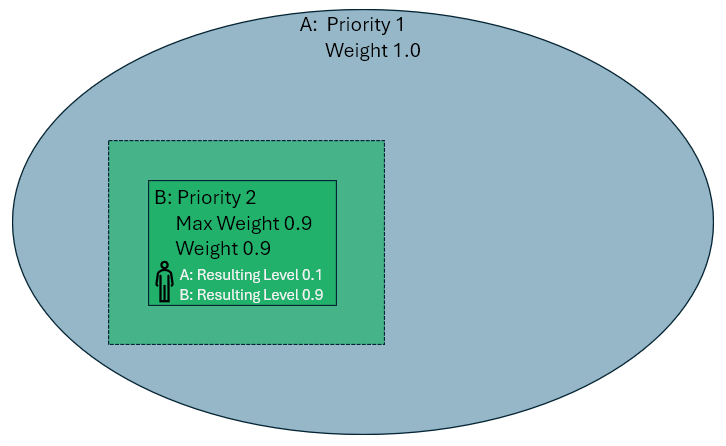
As already mentioned, the Attenuation Distance of any SweejAmbienceVolume affects how its Weight changes over distance, and so these changes between levels and the blend of multiple sounds will reflect the listeners current position.
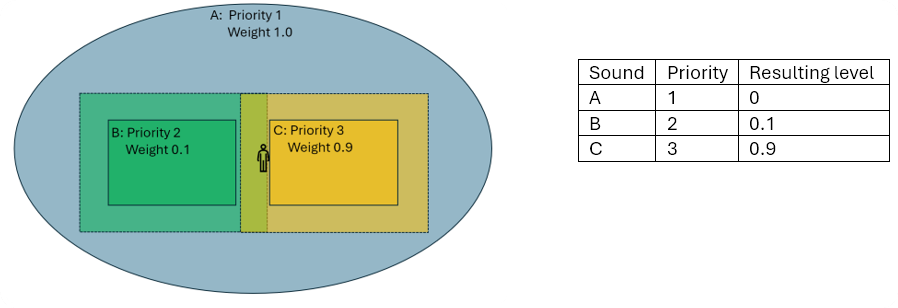
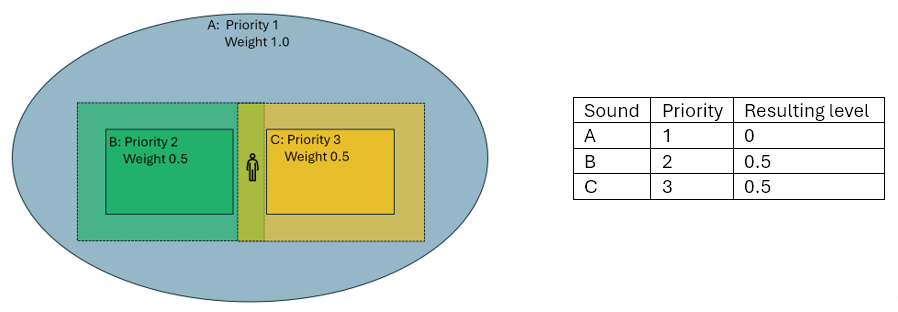
And as discussed above, if the listener is at a distance from the higher priority SweejAmbience Volumes such that their combined Weights do not equal 1.0, then this again leaves capacity in the sum of Resulting Levels for the SweejAmbienceSound (A) to also be heard.
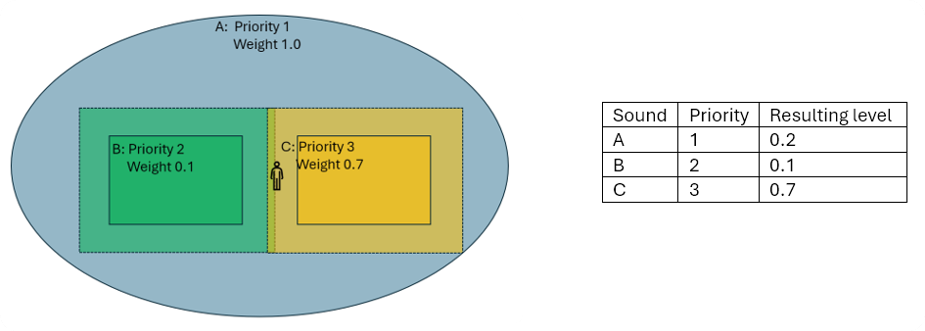
Note: These examples have used Priorities 1,2,3 for clarity, however when setting up your own system it's often good to use a wider range of values as a starting point, for example Global:0, Outdoor:10, Indoor:20. This allows you the flexibility to add other priorities in between these broad categories without needed to re-adjust the priorities of all the already existing actors.
Weights can also be dynamically adjusted via Blueprints to create dynamic environmental ambience systems such as for weather. See the Components and Extensibility page for more.
Multiple ambiences & Voice counts
A final thing to note is that the SweejAmbience system will automatically recognize when one sound is being used across multiple actors and will consequently scale that sound to an appropriate Sound Level in order to sound correct, without the need to use multiple voices or handle tricky fades between different copies of the same sound.
For example in example A below there are three different sounds playing and their Weight, Resulting Level and Sound Levels are scaled appropriately due to the players current position, however if sound assets are shared between actors then only one sound is played, and its Sound Level is factored accordingly. The Sound Level differs from the Resulting Level due to an equal power crossfade that is applied at this point to prevent a dip in perceived volume when crossfading between areas.
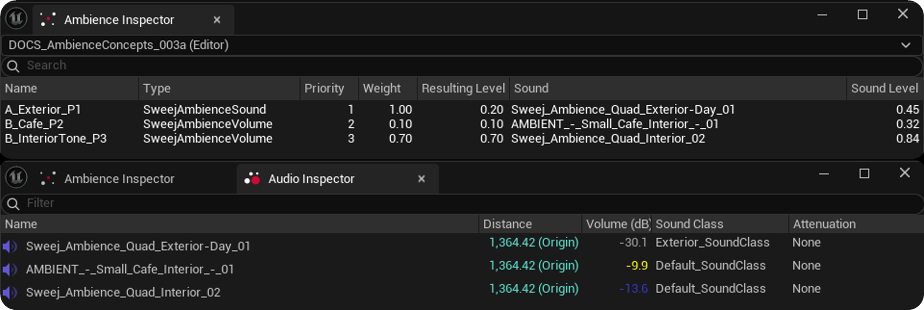
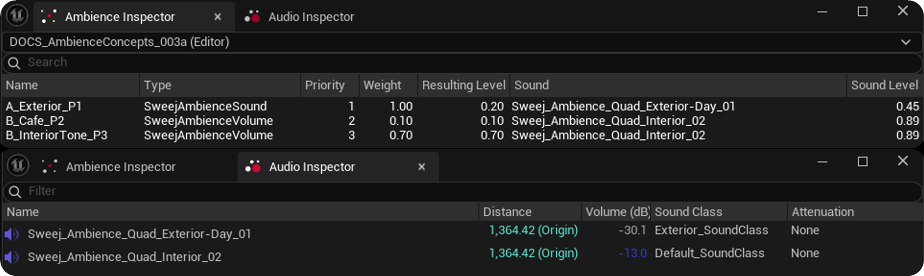
This saves on your voice count, and explains why you might occasionally see a set of resulting levels that appear to sum to more than 1.0.
The principles outlined above also apply to the Reverb Effect Chain Mix, and the Area Type Mix values, with the caveat that it is limited to two Reverb chains and two AreaTypes, named Primary and Secondary.