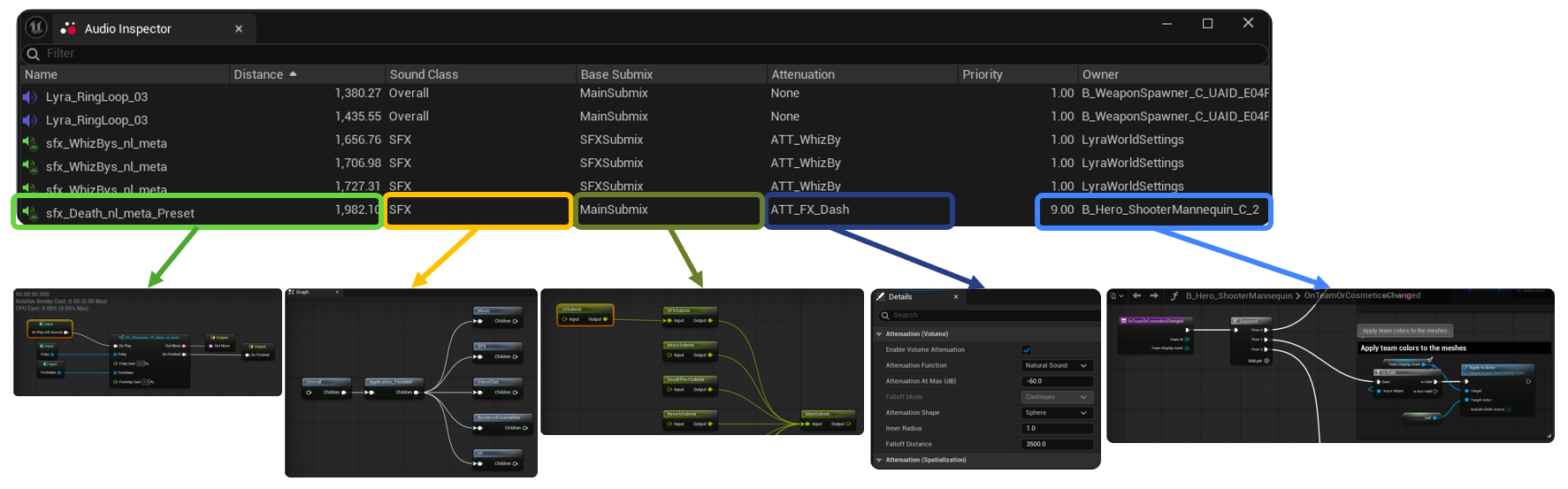
Opening & Locating Assets via the Inspector
Different icons in the Name column indicate the sound asset type:
| Icon | Type |
|---|---|
 | MetaSound |
 | Sound Cue |
 | Sound Wave |
Double click on items in the following columns to open the assets in their corresponding editors.
Shift + Double click on the items to locate them in the Content Browser.
Name: Opens the MetaSound Editor, Sound Cue editor, or Sound Wave editors Sound Class: Opens the Sound Class editor Base Submix: Opens the SubMix Editor Attenuation: Opens the Attenuation editor Owner: Opens the owning Blueprint